
MCP under the microscope: how AI agents talk to tools and what risks that brings
Length:
12 min
Published:
January 20, 2026
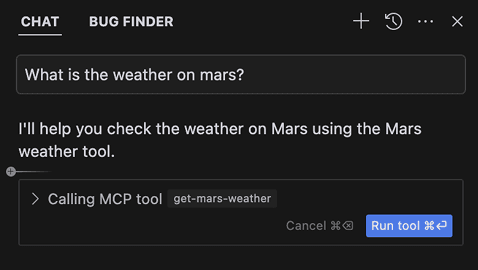
The Model Context Protocol changes how we work with AI tools. It also brings security risks you should understand before you put it into production.
Over the past year, the Model Context Protocol (MCP) has become one of the most discussed topics among developers who work with AI. This standardized protocol from Anthropic promises to connect large language models (LLMs) with external tools and data without extra plumbing for every integration. As with any new technology, though, big possibilities come with big risks.
In this article we look at how MCP works, why it suits modern software development, and above all what security threats it introduces and how to defend against them.
What the Model Context Protocol is and why it matters
MCP is only a specification, a standard that describes how LLMs should talk to external tools and data. Anthropic ships reference implementations alongside it (servers, clients, SDKs), but the open protocol is the core.
Before MCP, wiring each tool into an AI (in an IDE, for example) needed its own integration. With MCP you get one universal protocol for every tool.
MCP standardizes three main roles:
- Host is the application where the AI runs, such as Claude Desktop, Cursor, or VS Code.
- MCP Client is a piece of code inside the Host that knows how to call MCP servers.
- MCP Server is a local or remote server that provides tools (functions the AI can call), resources (access to files, APIs, and databases), prompts (prompt templates), and tasks (more complex operations).
It works simply. The Host connects through its MCP Client to an MCP server, the server exposes a list of available tools, and the LLM calls them through a standardized JSON-RPC interface.
What role MCP plays in AI software development
For teams doing modern software development, MCP changes how AI assistants work with the development environment. Instead of isolated tools that "see" only what you hand them by hand, MCP gives agents wider context:
- access to repositories and commit history,
- connections to project tools (Jira, Linear),
- communication tools (Slack, Teams),
- documentation and knowledge bases,
- CI/CD pipelines and deployment tools.
With this wider context, agents answer more precisely and to the point. When a developer asks the AI to analyze a problem, the agent reaches beyond the code into related tickets, earlier discussions, and deployment history.
Through MCP, agents also do more than read. They can create, update, and delete records in the connected systems.
The protocol is the contract, not the vendor, so those connections survive a change of tooling. That is why we argue the durable investment belongs in the MCP layer rather than in any one runtime.
How MCP works under the hood
Look closer at the architecture and you find MCP using JSON-RPC 2.0 for communication between client and server. Each MCP server describes its set of tools with structured tool descriptions that contain:
- the tool's name,
- a description of its function in natural language,
- the definition of input parameters,
- the expected output.
One detail matters: the LLM sees these descriptions, but the user does not always see them. And that is exactly where the security problems begin.
Why MCP is not secure on its own
In its current form, MCP puts features ahead of security. The specification has several fundamental weaknesses:
- No context encryption. Data between client and server is not protected automatically.
- No tool integrity check. You cannot verify that a tool has not been changed.
- Hidden tool descriptions. The user does not see the full tool descriptions that the LLM sees.
- "SHOULD" instead of "MUST". The spec says a human should be in the decision loop, but it does not enforce it.
So the default MCP setup is not secure and needs active steps to lock it down. On top of that, responsibility for the protocol's security is shared across everyone in the ecosystem:
- Protocol authors (Anthropic). The spec lacks authentication and authorization, lacks integrity checks, and "SHOULD have human in the loop" should be "MUST".
- MCP client developers. They often favor ease of use over security and add safeguards only later.
- MCP server developers. Speed of development frequently wins over security, and many servers are generated automatically from OpenAPI specs.
- API providers. They need granular access scopes and authorization.
- End users. Approving everything blindly together with MCP is a recipe for disaster.
The main categories of attack
The security threats around MCP fall into three basic categories:
1. A vulnerable MCP tool
An MCP server with implementation bugs, most often weak input validation or unsafe API calls. The developer created the vulnerability by accident.
2. A deliberately malicious MCP tool
A server that intentionally hides instructions or backdoors. The goal is to deceive both the LLM and the user.
3. The LLM cannot tell where input came from
A fundamental problem of LLM architecture. The model processes everything as text tokens and has no notion of a trusted versus an untrusted source.
Concrete threats, examples, and defenses for MCP developers and users
Threat #1: Command Injection
The problem: according to an analysis by Equixly, 43% of the MCP servers examined had a command injection vulnerability. Unsafe shell calls without input validation let an attacker run arbitrary code on the host.
The impact: Remote Code Execution (RCE), system compromise, credential theft.
How to defend:
- never run shell calls with user input,
- use
subprocess.run()with arguments as a list, not as a single string, - enforce a whitelist of allowed characters,
- validate and sanitize input thoroughly,
- do not use a mode in MCP clients that approves everything automatically.
Threat #2: Tool Poisoning
The problem: tool descriptions are in natural language and the LLM reads them, but the user does not. The model blindly follows the instructions in a description, so an attacker can hide malicious commands inside it.
How to defend:
- show users the full tool descriptions,
- alert on changes to descriptions,
- use syntax highlighting for suspicious tags,
- log every tool call with its parameters,
- keep natural language in descriptions to a minimum.
Threat #3: Rug Pull Attack
The problem: MCP servers can change their tool definitions at runtime, and the client does not surface those changes. A trusted tool can turn malicious over time, a classic supply chain attack.
The scenario:
- Day 1: you install a legitimate, useful MCP server.
- Week 2: the server runs and earns trust.
- Month 1: the author updates the server and adds malicious instructions.
- Result: the server now steals data while looking the same from the outside.
How to defend:
- pin versions, no automatic updates,
- audit tool descriptions regularly,
- verify integrity before every use.
Threat #4: Tool Shadowing
The problem: an MCP client can be connected to several servers at once. A malicious server can override or shadow tools from a trusted server, and the LLM cannot tell which server provided which tool.
Example: you have a trusted Gmail MCP server with send_email() connected. A malicious calculator server also offers send_email(), and it can change the recipient, alter the message body, or add a hidden copy to the attacker.
How to defend:
- use namespaces, prefer
gmail.send_email()oversend_email(), - set up a tool allowlist with explicit mapping,
- grade server trust, and allow critical operations only from verified servers,
- show the source of each tool in the UI,
- limit the number of servers connected at once.
Threat #5: Prompt Injection
The problem: an LLM cannot distinguish legitimate data from malicious instructions. Any untrusted input, whether GitHub Issues, pull request descriptions, or commit messages, can carry hidden commands.
A real-world scenario:
- An attacker opens an Issue in a public repository.
- The Issue looks like a legitimate feature request.
- A developer opens it in Cursor with the GitHub MCP.
- The agent reads the Issue and obeys the hidden instructions.
- The
README.mdends up stuffed with sensitive data.
The reality: prompt injection is a fundamental problem that cannot be solved 100% without changing the LLM architecture. A human in the loop therefore stays essential.
How to at least reduce the risk:
- structure prompts with a separate section for context,
- deploy guardrails and dedicated detection models,
- require explicit approval for every tool call.
Recommendations for MCP developers and users
For developers
- validate ALL input parameters,
- never call
os.system()with user input, - use
subprocess/execwith arguments as a list, - keep natural language in tool descriptions to a minimum,
- put every tool description through code review,
- log every tool call,
- write the tool's risks into the README.
For users
- install only trusted servers,
- pin versions, no automatic updates,
- read the tool descriptions before approving them,
- limit the number of servers running at once,
- watch the logs for unexpected behavior,
- do not approve everything automatically.
How to govern MCP in a company
Companies that want to run MCP in an enterprise setting need a thought-through governance framework. It should cover:
Approved list and classification
- a central registry of every MCP server you want to support,
- classification by the sensitivity of the data the servers can reach,
- mapping to business processes and their owners.
Access management
- a whitelist of allowed MCP servers,
- role-based access to individual tools,
- regular review of permissions.
Security controls
- isolation of MCP servers through containers (Docker),
- network segmentation,
- monitoring and alerting on anomalies,
- an incident response plan for AI-specific threats.
Compliance and audit
- logging of every tool call,
- regular security audits,
- documentation for regulatory requirements.
Education
- security awareness training focused on MCP and AI risks,
- guidelines for safe use,
- escalation procedures for suspicious behavior.
That framework gets concrete once a gateway sits in the middle of your MCP traffic. We walk through exactly what it has to secure in Enterprise MCP Gateway Security: What It Actually Has to Do.
Our solution for secure MCP
At DX Heroes we can see that the current state of MCP security will not hold up over time. So we are building our own product for the secure management and governance of MCP servers.
It will be able to:
- manage MCP servers centrally,
- detect security threats automatically,
- audit tool descriptions,
- report on compliance,
- connect to the security tools you already use.
You can find more at mcp.dxheroes.io.
Installation materials and public documentation for the Community Edition are in the DXHeroes/mcp-gateway repository.
Conclusion
MCP is a big step forward in connecting AI with developer tools. The potential to boost productivity is huge, but only when we can manage the security risks that come with it.
What to take away:
- MCP is not secure by default and needs active hardening.
- The security problems are real, not just theoretical.
- Prompt injection is a fundamental problem with no easy fix.
- Defenses exist, but they are not perfect.
- Responsibility is shared across the protocol, clients, servers, and users.
Do not let that put you off. MCP is a powerful tool that can improve your development workflow a lot. Just treat it with respect and put the right security measures in place.
Want to know more?
Curious how to deploy MCP safely at your company? We are happy to show you our solution and help you set up a secure AI infrastructure.
Reach out for a demo through the contact form.
Want to stay one step ahead?
Don't miss our best insights. No spam, just practical analyses, invitations to exclusive events, and podcast summaries delivered straight to your inbox.