
The AI-Native SaaS Playbook: How We Built Plantory End-to-End
Length:
8 min
Published:
April 22, 2026
This article is for builders. If you're the CTO, principal engineer, or tech founder asking "what does it actually take to build an AI-native product end-to-end?", this is the playbook.
It's based on Plantory.ai, the in-house AI-native SaaS we built at DX Heroes: 5,000+ users, 8 locales, and 15+ AI pipelines in production. For the why and the founder narrative, see Why We Built Plantory. For the polished case study with metrics, see the Plantory.ai case study.
What "AI-native" actually means
An "AI-powered" feature is easy: drop an LLM call in a route handler and you're done. AI-native is harder. It means AI is part of the product and the operation around it, not a topping.
Practically, AI-native splits into five surfaces:
- AI in the product: what users pay for
- AI in the media: what you send into the world
- AI in the distribution: how ads, campaigns, and traffic get deployed
- AI in the content: how blog, SEO, and lifecycle communications get produced
- AI in the build: how the codebase, specs, reviews, and releases happen
Most teams get one, maybe two, of these. All five together is where the advantage compounds.
Three architectural principles
Before the tools, three principles. These are the ones we'd keep regardless of model provider.
1. Ground state is the source of truth
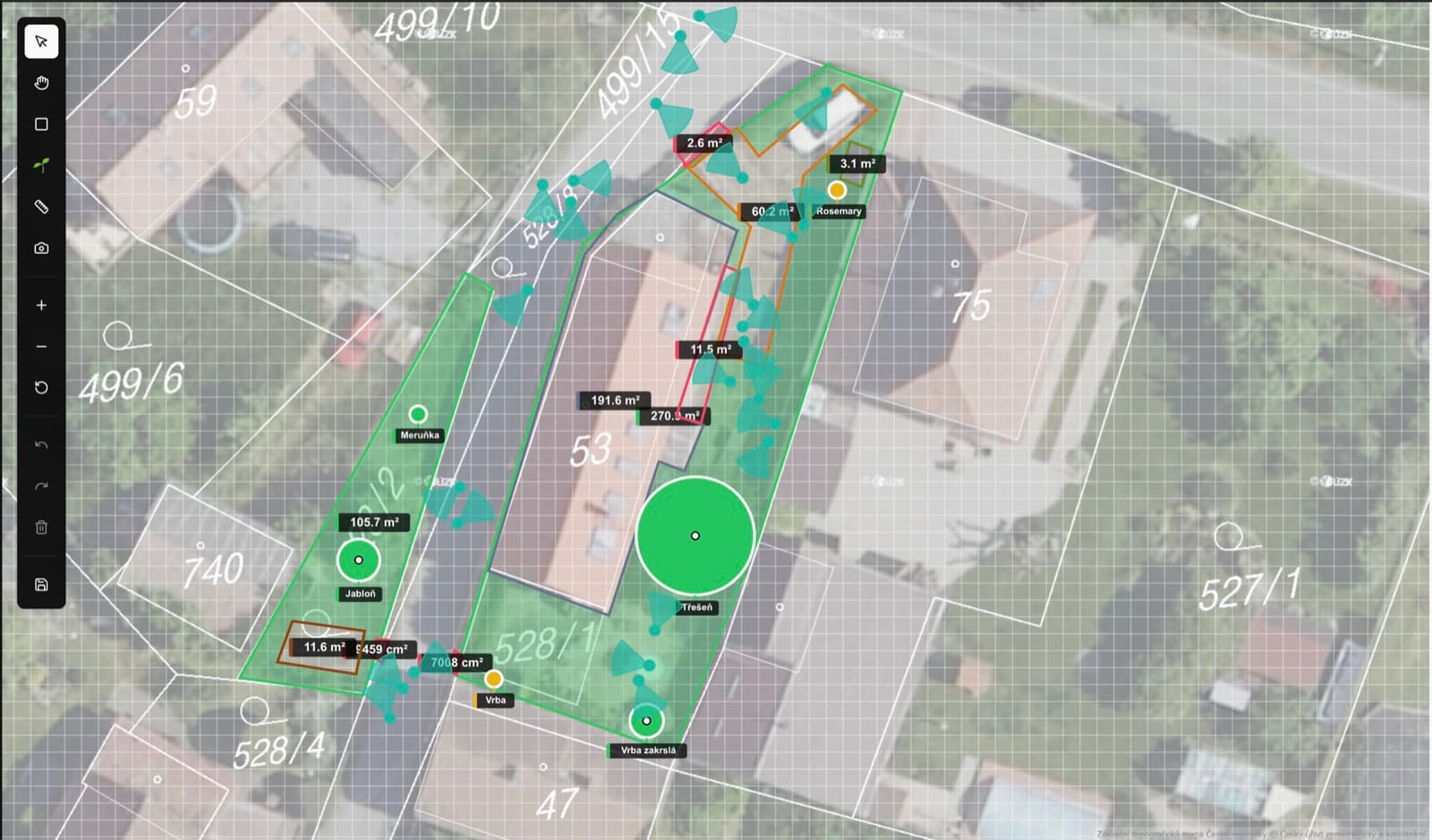
In Plantory, the garden model is canonical: a 2D canvas with zones, plants at real scale, climate zone, soil type, sun exposure, inventory, and history. Every AI call receives this state, not a freeform prompt.
This is the single biggest reason the advisor feels useful. Prompts without grounding are a shrug; prompts with a full spatial model are targeted recommendations. Same models. Different experience.
2. Backend-first data, AI on the edge
All persistent state lives behind a NestJS API. The Next.js web app is a presentation + AI streaming layer.
This matters because AI endpoints are inherently streaming, stateful, and failure-prone. You don't want your domain logic, auth, billing, and background jobs tangled up in route handlers. Put the AI where the latency sensitivity is (close to the user) and put the business rules where the durability matters (behind an API with contracts).
3. AI as context, not chrome
Every AI integration earns its place by making something specifically better. A chat pane that answers garden questions is not an AI feature; it's a chatbot. A chat pane that sees the canvas, knows it's USDA zone 7a, knows the user has clay-heavy soil, and remembers that last spring the tomatoes failed is an AI feature.
If you can't articulate what context makes the AI work, you don't have an AI product.
The five AI surfaces with the actual stack
Here's what runs in production at Plantory.
1. AI in the product
- Provider: Google Gemini via the Vercel AI SDK
- Patterns: streaming chat, structured output (for task generation), multimodal vision (for plant ID), tool calling (to look up plants and update the canvas)
- Endpoints: Next.js route handlers for the AI surface (
/api/gardens/[id]/chat,/api/gardens/[id]/tasks/generate,/api/gardens/[id]/plants/[plantId]/analyze), NestJS for everything else - Controls: per-request token caps, eval harness for regression on top tasks, structured logs
2. AI in the media
- Still images: Satori + Resvg + Gemini. We template the layout, AI generates the copy and illustration prompts, Satori renders to SVG, and Resvg rasterizes to PNG. It runs in a background job.
- Video: Remotion for programmatic video ads. AI writes the script, synthesizes voiceover, and produces the visual storyboard; Remotion renders to MP4.
- Scale: a single marketing brief turns into dozens of on-brand assets across locales without anyone opening Figma.
3. AI in the distribution
- Integrations: Meta Ads API and Google Ads API, direct
- Flow: AI generates creative variants from the brief, sets targeting and budget suggestions, and automation deploys flights via the APIs. A human reviews performance and approves scaling.
- Controls: hard budget caps at the platform level, daily performance evals,
/plantory:paid-performance-reviewcommand that audits campaigns and outputs recommendations
4. AI in the content
- Blog & newsletter:
/plantory:blog-articleand/plantory:newsletterskills in our Claude Code plugin. AI drafts the article, we review, and the MDX pipeline handles translation across all 8 locales with automatic linking and metadata. - Programmatic SEO: landing pages generated from templates + AI-filled content, per-locale, cross-linked
- Release notes: extracted from git history by AI, reviewed, published
5. AI in the build
This is the one most teams underestimate. We built an internal Claude Code plugin marketplace. The plantory plugin ships 20+ skills: spec-driven development (/plantory:spec-specify, /plantory:spec-plan, /plantory:spec-breakdown, /plantory:spec-implement), GitHub Project board orchestration (/plantory:board-seed, /plantory:board-ensure, /plantory:board-work), code review, refactor audits, quality gates, release pipelines, founder LinkedIn, Facebook trust-building.
Every workflow we used to do ad hoc with prompts is now a skill with a known shape, inputs, and outputs. We call this pattern Claude Cowork: AI agents as first-class teammates with defined jobs.
The result: specs get planned faster, code reviews are more consistent, GTM boards stay current, and new team members learn the system by running the skills rather than reading docs.
What we'd do differently
Three honest regrets, in case you're starting now.
Build the eval harness on day one. We got away with vibes for a while. When behavior drifted after a model update, catching it fast required tests we hadn't written yet. Start with a small eval set per AI endpoint. Grow it.
Budget caps before launches, not after. Our first programmatic ad test burned faster than expected because platform-level caps lagged the AI's throughput. Set the platform ceiling first. Let the AI tune within it.
Give the plugin marketplace a first-class home early. We treated ours as "scripts" until we saw the multiplier from packaging workflows as skills. The plugin marketplace pattern, not the individual skills, is the unlock.
Further reading
- Why We Built Plantory, and What It Taught Us About AI: the founder narrative
- Seven Lessons Plantory Taught Us About AI in Production: concrete, tactical learnings
- Shipping Large Refactors with AI: an 82-commit Plantory refactor merged in six hours with green tests
- The Plantory.ai case study: metrics and seven-pillar breakdown
If you're building an AI-native product and want a team that's actually done this, let's talk.
Want to stay one step ahead?
Don't miss our best insights. No spam, just practical analyses, invitations to exclusive events, and podcast summaries delivered straight to your inbox.